Handling postmortems is a repeatable process for running an incident: from the first alarm, through the fix, to the written postmortem and the review afterward. As a lead engineer on a web push platform, I managed our incident reporting process, standardized the postmortem template for the department, and wrote a flowchart so junior and mid-level engineers, and some product and sales staff, could run the early steps themselves.
When a service is down, the company is losing money and everyone is under pressure. A process everyone already knows keeps people working on the problem instead of on each other. This post walks through the one we used, step by step. It is for engineers, leads, and anyone who may end up running an incident.
The rules first
- Blameless by design. Nobody hides their work while the company is actively bleeding. The goal is to fix the problem and learn from it. The goal is not to find someone to blame.
- Keep logs every step of the way. The team will lots of information later, when the postmortem is written.
- Create a Postmortem. This keeps a record of incidents and when they occur. Occasionally private/internal issues occur. The postmortem is still written.
One of the most challenging things was getting everyone on board with these simple rules. Everything else depends on them.
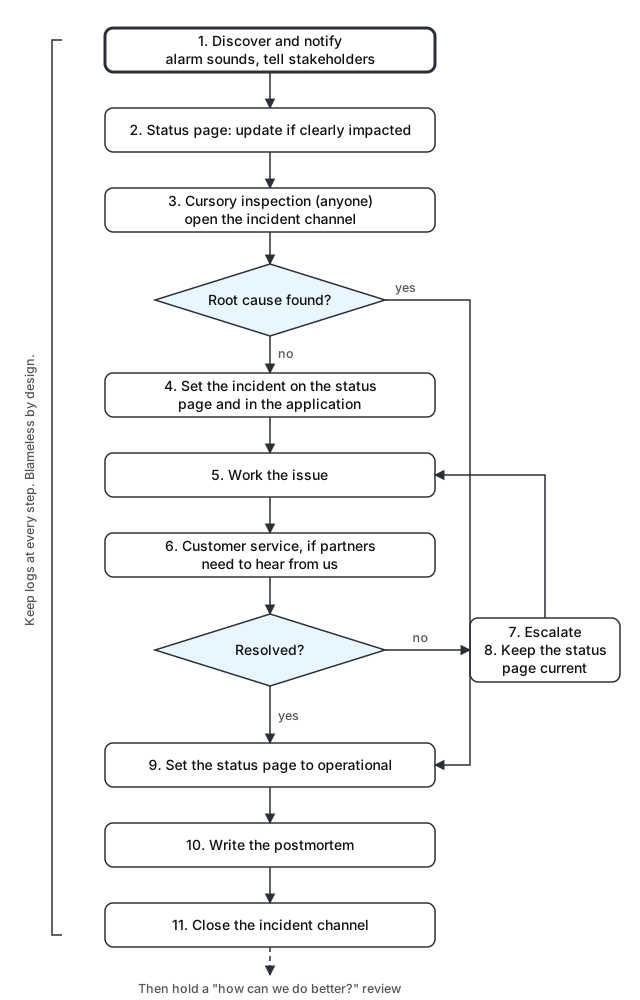
Incident Response steps
The general overview that the team is instructed to follow when something goes wrong.
- Discover and notify. About 95% of the time, the process begins because a Datadog or CloudWatch alarm is sounding. Notify the stakeholders and anyone who can help. This is occasionally messy if there is no clear owner for the affected system, or if the person who found the issue is unsure who to reach out to.
- Update the status page if the service is clearly impacted. We used Atlassian Statuspage. The public status page keeps showing the incident until it is cleared in Statuspage.
- Do a cursory inspection. Anybody can do this. If the issue is root-caused here, nobody else has to be involved. This is usually when an incident channel is opened in Slack, named by a standard pattern such as
#incident-p2-queue-latency. The channel is also the place for record-keeping (more on that below). - Set the incident on the status page and in the application. These two happen in parallel. On the status page, set the systems impacted, the estimated time to fix, and the current status: operational if it is not a big deal, degraded, partial outage, major outage, or under maintenance. Some of our applications also showed their own banner. Ideally that banner pulls from the status page automatically, but not every application had that yet, and sometimes the message needed to be more specific. When one table had high latency, for example, a dashboard was hotfixed temporarily to show a message like "Daily rev is experiencing slowness. Please bear with us. We're actively working on a fix. No data is lost."
- Work the issue. If nobody has started on the fix yet, start now. Sometimes one developer keeps the status updated while another fixes the issue.
- Bring in customer service when partners need to hear from us. Occasionally customer service reps are notified so they can reach out to partners directly.
- Resolve or escalate. Escalate to senior developers, or whoever else is necessary. If the cause is external but is hurting our services, a customer service rep may need to escalate to the third party.
- Keep the status page current. Update it as necessary, and repeat steps 5 to 7 as needed. New items are sometimes discovered along the way.
- Set the status page to operational. Eventually the issue is resolved, and the status page goes back to operational.
- Write the postmortem. Draft a full, proper postmortem from the compiled notes, emails, git logs, Slack messages, and anything else. There are usually a lot of final confirmations, so everyone involved should expect questions after we are "done." We used a modified version of the Incident postmortem template in Confluence.
- Close the incident channel. Delete the Slack channel after the issue is confirmed to be resolved. Occasionally it stays open for two or more days, when the issue is difficult to close with confidence right away.
Record-keeping in the incident channel
There is a whole art to this. The goal is to capture information in real time while also trying not to add to confusion later.
Early messages are frequently wrong, so the team is encouraged to add clarity to messages with replies in a thread, instead of posting new corrections. This prevent confusion from knowledge gaps if information drifts away from the original. It reduces "I thought you said..." moments by keeping the corrections nearby.
After the incident
Afterward, we always held a "how can we do better?" meeting.
The process is deliberately designed to be blameless. This allows developers and others to step forward and say "I owned this, and I see where it could be improved."