A release workflow that takes a change from a Jira ticket to a tagged, deployable release. It was used by the engineers on a team that built and serviced insurance marketplaces for carriers operating nationwide. Every change was tested locally, tested again in CI, reviewed by at least one other developer, and tagged on release, so any deploy could be rolled back.
The workflow kept a fast-moving team from stepping on each other. Stage stayed open for quick iteration, and main stayed protected. This page walks through it, step by step.
Enforced and expected
Some guardrails were enforced by the tooling. Others were team conventions. Both mattered.
- Enforced: green CI on every pull request, green CI on every merge to main, and at least one approving review before a merge to main (two for pull requests co-authored by Claude).
- Expected: running the test suites locally before opening a pull request, and requesting a code review before merging to stage, even though stage merges were unrestricted.
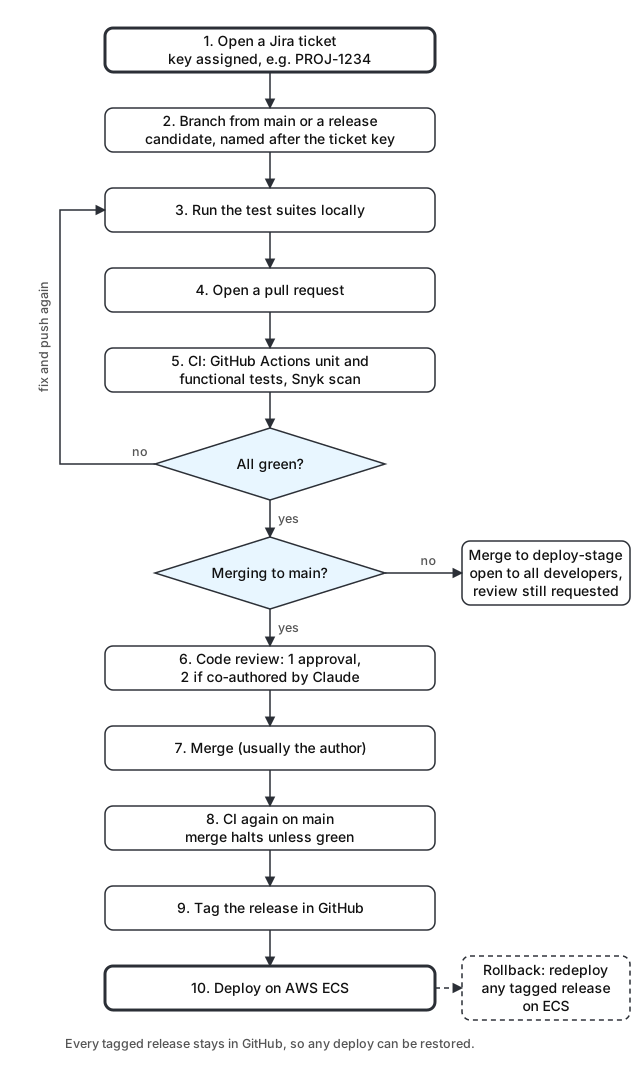
Release workflow steps
- Open a ticket. Every change starts as a Jira ticket. Jira assigns it a key, such as
PROJ-1234. - Create a feature branch. Branch from main, or from a release candidate when the change belongs to an upcoming release. Name the branch after the ticket key (
PROJ-1234) and Jira and GitHub link the ticket and the branch automatically, in both directions. - Run the test suites locally. Developers verify the change passes before anyone else spends time on it.
- Open a pull request. The branch targets main (
PROJ-1234→main) or the stage branch (PROJ-1234→deploy-stage). - CI runs on the pull request. Opening the pull request triggers GitHub Actions, which runs the unit and functional test suites in the cloud. Snyk scans the change for vulnerable dependencies at the same time. If anything is red, the pull request is halted until a fix is pushed and the checks pass.
- Code review. One or two developers review the pull request. Merges to main are blocked without at least one approval, and pull requests co-authored by Claude require two. Merges to stage are open to every developer, but a review is still requested first.
- Merge. Once approved, any participant can merge. Usually the author does it, though a busy author will sometimes ask a reviewer to merge for them.
- CI runs again on main. The merge to main triggers a second workflow. Anything other than a fully green test suite halts the merge.
- Tag the release. Once the suite passes and the commits are merged on origin, the release is tagged. Every tagged release is kept in GitHub.
- Roll back if needed. Because every release is tagged, any developer with permission can roll back to a specific deploy. Rollbacks happen at the AWS ECS level, by redeploying the tagged release.
Why it worked
Linking tickets and branches by name meant nobody had to hunt for the code behind a ticket, or the ticket behind a branch. Running tests in two places caught both "works on my machine" problems and changes that broke something elsewhere. The extra reviewer on AI co-authored pull requests kept speed from outrunning understanding.
Tagging every release turned rollback into a routine step instead of an emergency. When something went wrong in production, the question was which tag to return to, not how to undo a merge.